
IT Consultant / Freelancer

An Information technology Consultant or Freelancer is a professional who helps organizations find, analyze, organize, and use information to solve business problems or make better decisions. He should have been a good in depth and deep knowledge and working experiences of legacy (old) system and as well as new emerging technologies like Data Anlytics, Machine Lanageage, and AI. The exact responsibilities vary industry by industry, but the role generally combines research, data analysis, communication, and technology. Evaluate information quality and accuracy. No interferes from third party. Support business decisions with research and data.
Our core responsibilities are
Formal investigation of why you need this project?. Choose best suitable technology for the business. Advise clients or internal teams on information management. maintain team meetings and share project related information on time to the stakeholders. Have business knowledge bases and Positive attitude. Feasibility study of the project. Research information from reliable sources. Have good observation and keep relationship to all stakeholders. Analyze and identify trends, Risks or insights Advise clients or internal teams on information management Prepare reports, presentations, or dashboards. Organize knowledge bases, Road maps and documentation. Do strong research and analytical skills. Critical thinking and problem-solving.Proactively prepare project management plan, reports, presentations, or Road maps and documentation like error log, etc., Excellent on time written and verbal communication. Make transparency to all activities. maintain good possible way of motivation to you teams.
Ability to face any kind of situation. Ability to do strong research and analytical skills. Critical thinking and problem-solving.Excellent written and verbal communication. Make transparent to all activities. Evaluate information quality and accuracy. Support business decisions with research and data.
Information Consultants work in areas such as:
IT and technology, Qualifications & Education, Proficiency skills required Knowledge of databases and information management, Project management skills, Relevant certifications of PMP and other technologies can also improve your prospects, The role is increasingly valuable as organizations rely more on data-driven decision-making.
Anyone looking for Freelance ..... We are here .....
Project Management Plan Creation
Why Project Management Plan ?
A Project Management Plan is important because it serves as the roadmap for successfully completing a project. It helps everyone understand what needs to be done, who is responsible, and how the project will be managed. A Project Management Plan is essential because it acts as the foundation for the entire project. It guides the project team, helps manage resources and risks, ensures effective communication, and provides a structured approach to achieving project objectives. Without a well-defined project management plan, projects are more likely to experience delays, budget overruns, scope creep, and quality issues..
- Provides Clear Direction
- Defines the project's objectives, scope, timeline, and deliverables.
- Ensures everyone understands the project's goals.
- Improves Communication
- Establishes communication methods among team members and stakeholders.
- Reduces misunderstandings and keeps everyone informed.
- Defines Roles and Responsibilities
- Clearly identifies who is responsible for each task.
- Increases accountability and avoids confusion.
- Helps Manage Risks
- Identifies potential risks early.
- Includes strategies to prevent or minimize their impact.
- Controls Time and Cost
- Sets schedules and budgets.
- Helps track progress and prevent delays or cost overruns.
- Ensures Quality
- Defines quality standards and acceptance criteria.
- Helps ensure the final product meets customer expectations.

- Supports Decision-Making
- Provides a structured approach for handling changes and resolving issues.
- Enables project managers to make informed decisions.
- Monitors and Measures Progress
- Establishes performance metrics and milestones.
- Makes it easier to identify problems and take corrective action.
- Manages Changes Effectively
- Includes a change management process.
- Prevents uncontrolled changes from affecting project success.
- Increases the Chances of Project Success
- By planning scope, schedule, cost, quality, resources, communication, and risks, the project is more likely to be completed on time, within budget, and according to requirements.
Key Reasons for Project Failure
- Unclear Objectives: Starting work without defined, measurable goals means no one knows what success looks like or which tasks matter most.
- Scope Creep: Unchecked new requests and expanding ideas stretch the team and resources beyond the original budget and timeline.
- Poor Communication: Siloed teams and missing updates lead to mismatched expectations, confusion, and delayed decisions.
- Unrealistic Deadlines: Timelines pulled from thin air or forced without proper resource planning cause rushed work and burnout.
- Lack of Leadership: Without active executive support or a single accountable owner, projects lose momentum and face resource shortages
Migration / Transform
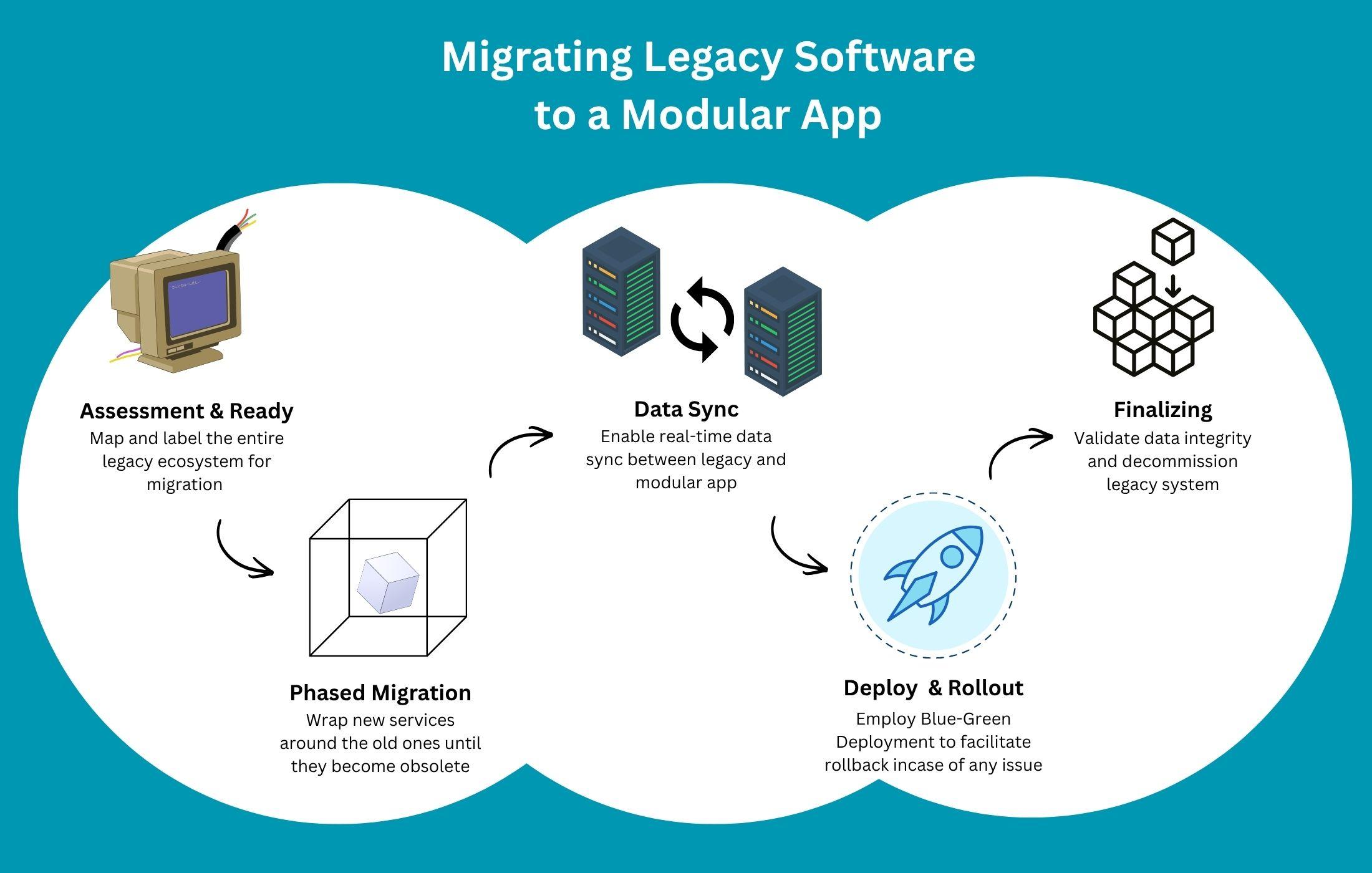
Information Technology (IT) migration is the process of moving IT resources—such as data, applications, systems, servers, or infrastructure—from one environment to another with minimal disruption to business operations.
Why to perform IT migration
- Improve performance and scalability
- Reduce maintenance and infrastructure costs
- Enhance security and compliance
- Upgrade outdated systems
- Support business growth and digital transformation
Some of the common types of IT migration include:
- Data Migration
- Moving data from one database, storage system, or platform to another.
- Example: Transferring customer records from an old database to a new one.
- SAP ECC to HANA
- Application Migration
- Moving software applications to a new environment.
- Example: Migrating an on-premises application to a cloud platform.
- Cloud Migration
- Moving workloads, applications, or data from on-premises infrastructure to cloud services, or between cloud providers.
- Example: Moving a website from a local server to a cloud platform.
- Server Migration
- Transferring applications, data, and services from one server to another.
- Example: Replacing an old physical server with a newer virtual server.
- Operating System Migration
- Upgrading or switching to a different operating system.
- Example: Moving from Windows Server 2016 to Windows Server 2025.